A cool smart notebook for actual writing
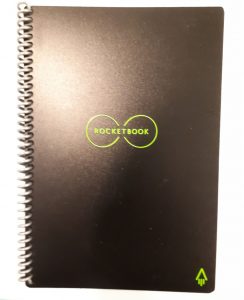
The Rocketbook, a writer’s smart notebook
As far as convenient hand written notes go, there are a few known digital methods available : a smart pen, smart notebook, tablet (and stylus), and of course, the right note-taking software. In my research, I was rather excited in discovering one or two other choices. I take a lot of notes as an entrepreneur, writer and private mentor. Transcribing from paper to a computer or tablet does waste a fair bit of time. And even if we are paper readers, there is the inconveniences of carrying around different notebooks for different subjects (or business projects).
Firstly, and I say this with a fair bit of regret, I have eliminated the smart pen. There are only three supposedly reliable brands touted but alas I have read some reviews that even with these brands, some pens died in a year and for a $200 to $300 investment, I would say that’s just a no go. You can get a light Chromebook, a fairly good tablet and a stylus for that price and chances are they’d last more than a year. Plus a tablet has way more functionality than even the ultimate smart pen.
I am hence going to mention more affordable options. How many of you hardworking entrepreneurs and students have heard of an everlasting notebook? Well, there is something in the market sort of everlasting. As a writer and researcher, I’m always on the look out for a way to allow me to hand write and yet have my work in the digital ether.
I was attracted to the Rocketbook Everlast Reusable Smart Notebook as it seemed like a portable whiteboard which (when photographed) automatically sent handwritten notes to my devices. Its US$32 price is the one thing that beats the Moleskin Smart Writing Set.
If there are occasions where you aren’t supposed to type on a noisy keyboard (like in an office meeting) or you can’t work on a laptop (like on the bus), you may like this $30 Kickstarter-funded smart notebook. The pages are durable and tear-resistant. It’s like a hardy notebook, except that you can erase your notes with a damp micro-fibre cloth (given) or a wet paper towel. You can use your Rocketbook daily and erase it when the 32 pages are filled. It’s best to write with the included FriXion pen which wipes off the easiest. Your pages will look pretty pristine again once you wipe it clean.
The other key aspect is the simple Rocket app for both the Android or Apple phone. Scanning them into my phone was pretty simple as long as I had good room lighting. There are seven symbols at the bottom of each page. I have assigned different notes with different symbols such as writing, coaching and online business. I’ve also created folders with the same subjects, some on my OneDrive and others on my Google Drive. The Rocketbook App will automatically send your notes according to what symbol you circled to the specified folder and storage place (if you choose auto-mode in your setting). This other possible storage places include Dropbox, Evernote, Box, OneNote, Slack, iCloud and email. When I write a Rocket page about coaching, I circle the symbol that I have assigned to coaching. I then scan the page and my phone app sends that page either as a PDF or a JPEG to the specific folder.
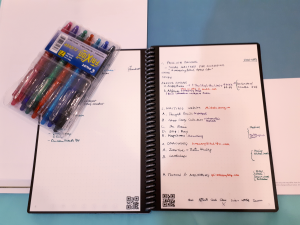
Hand-write, color code & cloud-store your notes
I do like how incredibly smooth the FriXion pens write on the pages. I ordered the pack of 7 to color code my notes. The notebook has allowed me to write my to-do list for the week which I cross off when done, while allowing me to scan the week’s work so that I have a digital record of my progress. I will admit I still have a habit of grabbing my phone and typing in a new piece of information in my phone memo when I’m in a rush.
Cons: A small annoyance was that I sometimes forgot to let the ink dry on the plastic-like page surface and a word or two would smudge when I started taking notes on the next page. I was going to gripe about the Rocket app and its inability to allow for text recognition. However, I was surprised to learn that when I uploaded my notes into my laptop, the OCR allowed a large number of my handwritten words to be accurately translated into MS Word text.
The competitors: The Moleskine’s $194 Smart Writing Set, which I will also review, has the extra edge as it allows you to accurately turn handwritten notes into text which be integrated into documents. The $100 Wacom Bamboo Slate offers editing tools and most useful of all, handwriting recognition. Both are worthy considerations if you’re willing to shell out the expense although there have been some negative reviews regarding the given pen in the Moleskin Set, which does cause hesitation with its costly price. This is just one option I have added to my writing tools that allows me to carry something lighter than my laptop. And hopefully, it will cut down on buying too many notebooks.
Bottom line: The Rocket Book offers an affordable handwritten and colour coded solution that also helps me remain organized with an efficient automatic filing system. I have actually started to intuitively grab this notebook whenever I need to write a fair amount of notes down, knowing that I will be able to quickly load it to my cellphone, laptop or cloud storage for quick reading.
The Rocket Smart Notebook can be safely and promptly delivered from this Amazon supplier.


